
 951-249-7500
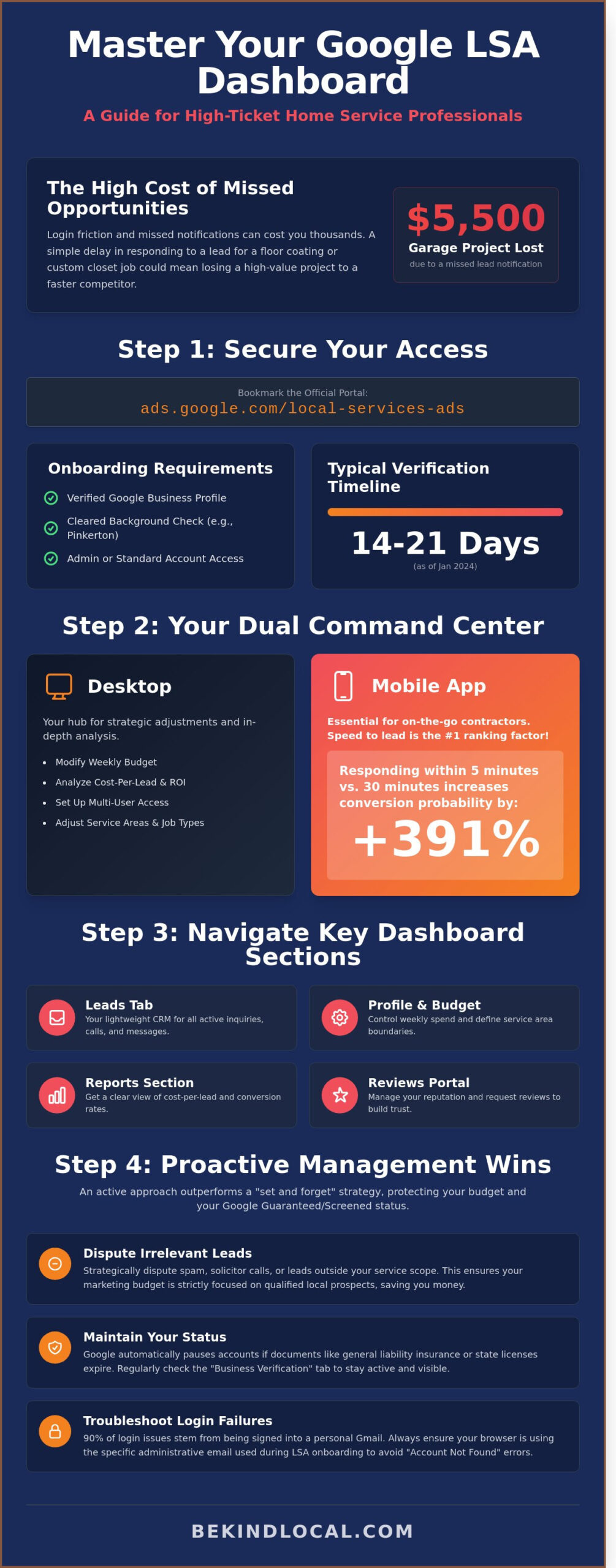
What if a simple delay in accessing your google lsa login cost your floor coating business a $5,500 garage project? For many owners in the polyurea and polyaspartic industry, the friction of navigating multiple Google accounts leads to missed notifications and lost connections. You’re likely tired of the constant switching between profiles just to see if a new lead arrived. It’s a common frustration that pulls you away from the job site and into a digital maze when you’d rather be focusing on your craft.
We agree that your marketing should be a supportive partner, not a source of stress. You deserve a system that brings in high-quality closet organization or HVAC leads without forcing you to pay for junk inquiries that don’t fit your expertise. This guide promises to show you how to master your dashboard to drive better results and reclaim your time. You’ll find a clear workflow for managing leads and the exact steps to dispute bad calls, ensuring your budget stays focused on growing your local presence and your business.
Key Takeaways
- Access the google lsa login portal and learn to distinguish your specific LSA credentials from standard Google Ads for more streamlined account management.
- Navigate the Leads Tab to efficiently manage and respond to high-ticket inquiries for specialized services like epoxy floor coatings and custom closet installations.
- Protect your Google Guaranteed or Screened status by identifying compliance warnings and keeping essential business documents updated directly within your dashboard.
- Learn the strategic process of disputing irrelevant or spam leads to ensure your marketing budget is strictly focused on qualified local prospects.
- Understand why active dashboard management outperforms a “set and forget” approach for garage specialists and home organization businesses in competitive markets.
Accessing the Google LSA Login: Portals and Requirements
To manage your lead flow effectively, you must bookmark the official google lsa login portal at ads.google.com/local-services-ads. While Local Services Ads (LSA) sits under the Google Ads umbrella, the dashboard functions as a distinct environment tailored for lead management rather than keyword bidding. You won’t find the complex “Search Term” reports here; instead, you’ll find a streamlined list of active inquiries and recorded calls. Access isn’t granted to everyone. Your entry depends on a verified Google Business Profile and a cleared background check through providers like Pinkerton. As of January 2024, the verification window for new garage remodeling or floor coating accounts typically spans 14 to 21 days.
Your credentials often mirror your standard Google Ads identity, but the permissions are specific. You need “Admin” or “Standard” access to view the lead inbox. If you’re a specialist in polyurea or polyaspartic floor coatings, your dashboard will prioritize “Service Categories” over traditional ad groups. This distinction ensures that when a homeowner searches for “garage floor epoxy,” your profile appears based on your proximity and responsiveness rather than just your bid amount.
Desktop vs. Mobile Login Methods
Desktop access is your command center for strategic adjustments. Use the web-based dashboard to modify your weekly budget or analyze your cost-per-lead data. If you’re scaling a custom closet business, the desktop view allows you to see which specific categories, like pantry or mudroom storage, are driving the highest ROI. You can also set up multi-user access here. Assigning your office manager “Standard” access allows them to handle billing while you maintain control over the strategic “Ad Schedule” settings.
The LSA mobile app is essential for contractors on the move. When you’re mid-installation on a polyaspartic floor project, you can’t wait until evening to check leads. Speed to lead is the primary ranking factor in LSA; responding within 5 minutes increases your conversion probability by 391% compared to a 30-minute delay. The app sends push notifications directly to your phone, allowing you to click-to-call or message the lead instantly from the job site.
Troubleshooting Common Login Failures
If you encounter an “Account Not Found” error while troubleshooting your google lsa login, verify that you aren’t signed into a personal Gmail account. This is the cause of 90% of login issues for local service providers. Ensure your browser is synced with the specific administrative email used during the LSA onboarding process. If the account appears active but you aren’t receiving leads, check your “Business Verification” tab. Google automatically pauses accounts the moment general liability insurance or state licensing documents expire.
Managing multiple locations requires a single login linked to a manager account (MCC). This setup prevents cross-contaminating lead data between different service areas. For example, if you have separate crews for garage remodeling in two different cities, a unified login allows you to toggle between dashboards without logging out. This keeps your lead tracking clean and ensures your marketing spend is attributed to the correct local market.
Ready to dominate your local market? Schedule a discovery call with Be Kind Local today. We specialize in helping floor coating and home organization brands stand out through expert local SEO and high-conversion Google Ads strategies.
Navigating the LSA Dashboard: Key Sections for Business Owners
Once you complete your google lsa login, you’ll find a command center designed to turn local searchers into high-value clients. This interface is more streamlined than the standard Google Ads platform, focusing entirely on lead quality and conversion. It’s your primary tool for managing the face of your business in local search results.
- The Leads Tab: This is where your active inquiries, calls, and messages live. It acts as a lightweight CRM to track every interaction from the moment a homeowner clicks your ad.
- Profile & Budget: You can adjust your weekly spend here and define your service area boundaries. This ensures you aren’t paying for leads in zip codes your crews won’t visit.
- Reports Section: This area provides a clear view of your cost-per-lead. It allows you to analyze conversion rates over specific dates to see which months drive the most garage remodeling projects.
- The Reviews Portal: Google LSAs rely heavily on trust. This portal lets you manage and request reviews specifically to boost your LSA visibility and “Google Guaranteed” status.
Effective management requires checking these sections daily. If you’re looking to optimize these settings for better ROI, a strategic local marketing partner can help you fine-tune your targeting to reach the most profitable neighborhoods.
The Critical Importance of the “Leads” Tab
The Leads tab is the heartbeat of your account. Google categorizes leads into “New,” “Active,” and “Booked” statuses. You must move leads through these stages promptly. Your response time within the dashboard directly impacts your future ad ranking. If you leave a message unreturned for more than 24 hours, Google may deprioritize your ad in favor of a faster competitor. Use the call recording feature to evaluate how your sales team handles pantry or walk-in closet inquiries. Listening to these calls helps you identify if they’re successfully setting appointments or letting warm leads slip away.
Managing Your Service Area and Schedule
Precision is key when defining your service area. Don’t just target an entire county; focus on specific high-value neighborhoods where homeowners are more likely to invest in premium polyaspartic coatings or custom mudroom systems. You can use the “Ad Schedule” to ensure your ads only run when someone is available to answer the phone. This prevents missed calls that hurt your ranking. If your garage remodeling crew reaches full capacity for the next 14 days, use the pause feature immediately. Pausing your ads during peak seasons or when you’re overbooked protects your budget and ensures you only pay for leads you can actually service.
A successful google lsa login session should result in updated lead statuses and a quick review of your weekly spend. Staying active in the dashboard tells Google that your business is responsive and reliable. This consistency is what keeps your phone ringing with qualified local homeowners.
Maintaining Your Google Screened or Guaranteed Status
Your google lsa login is the gateway to your business’s reputation. It’s the primary place you’ll see red flags or compliance warnings that could pause your lead flow. Google doesn’t just grant a trust badge and walk away; they continuously monitor your standing to ensure you remain a safe choice for homeowners. If you ignore these alerts, you risk losing the Google Guaranteed or Google Screened badge, which can drop your lead volume by 50% or more overnight.
Google also tracks your responsiveness through the dashboard. Every time a lead calls or messages, the system measures how quickly you interact with that potential customer. High-performing garage remodeling and floor coating companies typically respond to 95% of inquiries within 24 hours. If your response rate dips, Google will lower your ad placement, favoring competitors who are more attentive to their dashboard notifications.
Document Management and Compliance
Compliance is the backbone of your LSA success. Audit your insurance documents every six months to prevent automatic account suspension. Google requires active general liability insurance, and if your policy expires, your ads stop running immediately. For floor coating specialists, it’s vital to upload new certifications for specialized services like polyurea system installations as you expand your offerings. This ensures your profile stays relevant and authorized for high-ticket leads.
- Background Checks: Ensure your background checks remain current for all customer-facing employees, including closet installers and sales reps.
- License Verification: Upload updated state or local licenses as soon as they’re renewed to avoid verification gaps.
- Regular Audits: Use your google lsa login weekly to verify that no documents are flagged for “re-verification” by the Google compliance team.
The Feedback Loop: Reviews and Trust
The dashboard includes a powerful “Ask for Review” feature that you should use for every completed job. These verified LSA reviews carry more weight than standard Google Business Profile reviews because they’re linked to a tracked lead. When a homeowner sees that “Verified” tag next to a review for a mudroom storage project or a polyaspartic garage floor, their confidence in your brand increases significantly.
Managing feedback is just as critical as requesting it. If you receive a negative review, you must respond directly within the LSA interface. Addressing concerns quickly shows Google and prospective clients that you’re committed to quality service. Proactive management of these interactions helps maintain the high star rating required to keep your Google Guaranteed status active in competitive local markets.
Staying on top of these requirements is how you dominate your local market. If you’re ready to scale your lead generation and ensure your dashboard is fully optimized, schedule a discovery call with Be Kind Local today. We specialize in helping home service brands like yours stand out and convert more high-quality leads.
Lead Management Strategies for High-Ticket Home Services
High-ticket home services require a surgical approach to lead management. When you access your google lsa login, you aren’t just checking a notification bell; you’re acting as a gatekeeper for your sales team. For a custom closet business, a lead for a $15,000 walk-in closet renovation is the priority. You don’t want to waste $30 on a lead for someone looking for “cheap wire shelving” or “DIY floor kits.” Strategic dashboard management ensures your budget supports high-margin polyurea and polyaspartic floor coatings rather than low-intent queries. The same principle applies across all home service trades; for example, a well-executed digital marketing for plumbers strategy focuses on capturing high-margin whole-house repipes rather than low-value drain cleaning calls.
Mastering the Lead Dispute Process
Google allows you to claw back spend on leads that don’t meet specific quality standards. This isn’t about being difficult; it’s about financial transparency and budget protection. You can successfully dispute charges for prospects outside your service area, spam calls, or customers seeking services you don’t offer. Data from early 2024 indicates that active dispute management can recover 12% to 18% of a monthly ad budget for garage remodeling contractors. Be prepared to use the call recordings within the dashboard as evidence of a “wrong service” or “spam” interaction. Dispute invalid leads within 30 days to reclaim budget for qualified concrete coating prospects.
Niche-Specific Lead Optimization
Refining your “Job Types” is the most effective way to improve ROI without increasing your total spend. If your focus is high-end home organization, you should prioritize walk-in closets, mudrooms, and slatwall installations while disabling generic “handyman” or “shelving” categories. For floor coating specialists, this means selecting “garage floor coating” but excluding “concrete repair” if you don’t handle structural foundation work.
Effective lead management doesn’t end at the google lsa login screen. To create a seamless workflow, integrate your LSA data directly with your CRM, such as Jobber or Salesforce. This connection ensures that a “New Lead” status in Google automatically triggers a follow-up sequence in your system. Speed to lead is vital; a 5-minute response time increases your chances of booking a garage or closet consultation by nearly 400% compared to a 30-minute delay. By treating every LSA notification as a high-value asset, you transform the dashboard from a simple ad tool into a growth engine for your local brand.
If you want to stop wasting money on irrelevant calls and start booking more high-margin jobs, it’s time to refine your strategy. Schedule a discovery call with Be Kind Local to optimize your lead flow and dominate your local market.
Why Strategic LSA Management Wins Over DIY
Most garage remodeling business owners treat their google lsa login like a light switch. They turn it on and expect a steady stream of high-intent leads to flow in without further effort. This “set and forget” mentality is exactly why 42% of local service providers overpay for unqualified leads. Success requires more than a basic setup; it demands continuous refinement. If you aren’t actively managing your dashboard, you’re likely leaving high-margin floor coating and home organization projects to your competitors.
Active management means looking at the nuances of your service area. We don’t just hope for the best. We analyze which zip codes produce the highest-margin projects for custom closets or mudroom systems. Buying a lead is a simple transaction, but owning a market is a strategy. We integrate your LSAs with custom web design and conversion-focused content. When a homeowner searches for “pantry organization” or “walk-in closet systems,” they should see your brand everywhere. This synergy builds trust that a standalone ad cannot achieve.
The Be Kind Local Approach to LSA
We don’t just monitor your dashboard. We actively optimize it. For floor coating specialists, this means bidding strategically on high-value terms like “polyaspartic garage floors” rather than generic categories. We perform weekly lead audits. If a lead isn’t a qualified homeowner in your service area, we dispute it immediately. This process often reclaims 15% of a monthly ad budget. We also use your google lsa login data to inform your broader Local SEO strategy. This ensures your Google Business Profile and ads work together to dominate local search results.
Next Steps: Schedule Your Discovery Call
Stop guessing with your marketing budget. Transitioning from a DIY setup to a professionally managed lead machine allows you to focus on your installations. During a strategy session, we’ll analyze your current dashboard performance and identify gaps in your local visibility. We provide a clear roadmap to move from buying random leads to dominating your specific niche. You’ll see how a specialized partner can turn your ad spend into a predictable growth engine. Schedule a discovery call with Be Kind Local to maximize your LSA performance.
Master Your Lead Flow and Dominate Your Local Market
Your google lsa login is the gateway to high-intent leads, but simply having access isn’t enough to win. To stay ahead in the floor coating and home organization industries, you’ve got to treat your dashboard as a live performance tool. Data shows that contractors who respond to leads within 30 seconds maintain a significantly higher ranking than those who let notifications sit for hours. Successful operators don’t just check the app; they optimize their profiles and strictly maintain their Google Guaranteed status to keep the phone ringing. Whether you’re selling polyaspartic garage floors or custom mudroom systems, lead quality depends on how you categorize and dispute calls within the portal.
Managing these campaigns requires constant attention that most busy owners can’t spare. Be Kind Local acts as your strategic partner, handling the technical heavy lifting so you can focus on the job site. We specialize in marketing for floor coating and home organization brands, moving beyond basic DIY tactics to deliver a managed Local SEO and LSA strategy that actually converts. We provide a direct, fluff-free partnership built on real results rather than vague agency promises.
It’s time to turn your local presence into a predictable growth engine.
Frequently Asked Questions
Where do I find the Google LSA login page?
You can access the Google LSA login page directly by visiting ads.google.com/local-services-ads/ or by using the dedicated Local Services Ads mobile app. Once you arrive at the site, click the “Sign In” button located in the top right corner of the screen. It’s essential to use the specific Google account credentials that are tied to your business verification and background check to ensure you see your active leads immediately.
Can I log in to Local Services Ads through the standard Google Ads app?
No, the standard Google Ads app doesn’t provide the interface needed to manage lead disputes or listen to recorded calls. You’ll need to download the separate Local Services Ads app from the Apple App Store or Google Play Store for mobile management. While your billing information might be shared across the platform, the LSA dashboard is a specialized tool designed specifically for high-intent lead communication and tracking.
What should I do if I forgot my Google LSA login password?
You should use the standard Google Account Recovery tool if you’ve lost your password or can’t access your profile. Since January 2024, Google has implemented stricter multi-factor authentication for service providers to protect sensitive customer data. Follow the prompts to verify your identity via a backup email or SMS code. If you’re locked out, the manual review process can take 48 hours to restore your access to the dashboard.
How do I dispute a lead after logging into the LSA dashboard?
You dispute a lead by navigating to the “Leads” tab in your dashboard, selecting the specific lead, and clicking the “Dispute” button. You’ll need to provide a concrete reason, such as the lead being outside your service area or requesting a service you don’t provide, like roofing when you specialize in polyurea floor coatings. Google typically reviews these requests within 7 to 10 business days to determine if a credit is warranted.
Why is my Google LSA account paused even though I can log in?
Your account is likely paused because of an expired insurance document or a pending background check update. Even if your google lsa login works perfectly, ads will stop running if your general liability insurance isn’t updated annually in the “Business Verification” section. Check your dashboard notifications for a red alert icon. This usually points to a specific 2024 compliance requirement that needs your signature or a new document upload.
How do I add a new user to my Google LSA account?
You add a new user by clicking the menu icon in your dashboard, selecting “Settings,” and then choosing “Account Access.” Enter the email address of your team member and select an access level, such as “Standard” or “Admin.” This allows your custom closet designers or garage storage installers to manage leads and schedule appointments without needing your primary owner credentials. It’s a safer way to delegate lead management across your team.
Is there a difference between the Google Business Profile login and LSA login?
Yes, these are different platforms with different goals, even if they use the same email address. Your Google Business Profile manages your organic map ranking and customer reviews, while your google lsa login gives you access to the paid lead generation platform and the Google Guaranteed badge. For floor coating contractors, maintaining both is critical to capturing the 75 percent of searchers who look at both local ads and organic map results.
Can I manage multiple business locations from one LSA login?
You can manage multiple locations by setting up a Google Ads Manager Account or by using the account selector within the LSA interface. This is a strategic move for custom closet franchises or HVAC companies that operate in 3 or more distinct territories. It allows you to switch between different service areas to adjust daily budgets and review lead quality for each specific market without the need to log out and back in.
Managing your local presence requires more than just a login; it requires a strategic partner who understands your specific niche. Be Kind Local specializes in helping floor coating, garage remodeling, and home organization brands dominate their markets through expert local SEO and conversion strategies. Schedule a discovery call with Be Kind Local today to see how we can turn your LSA dashboard into a consistent source of high-quality leads.