
 951-249-7500
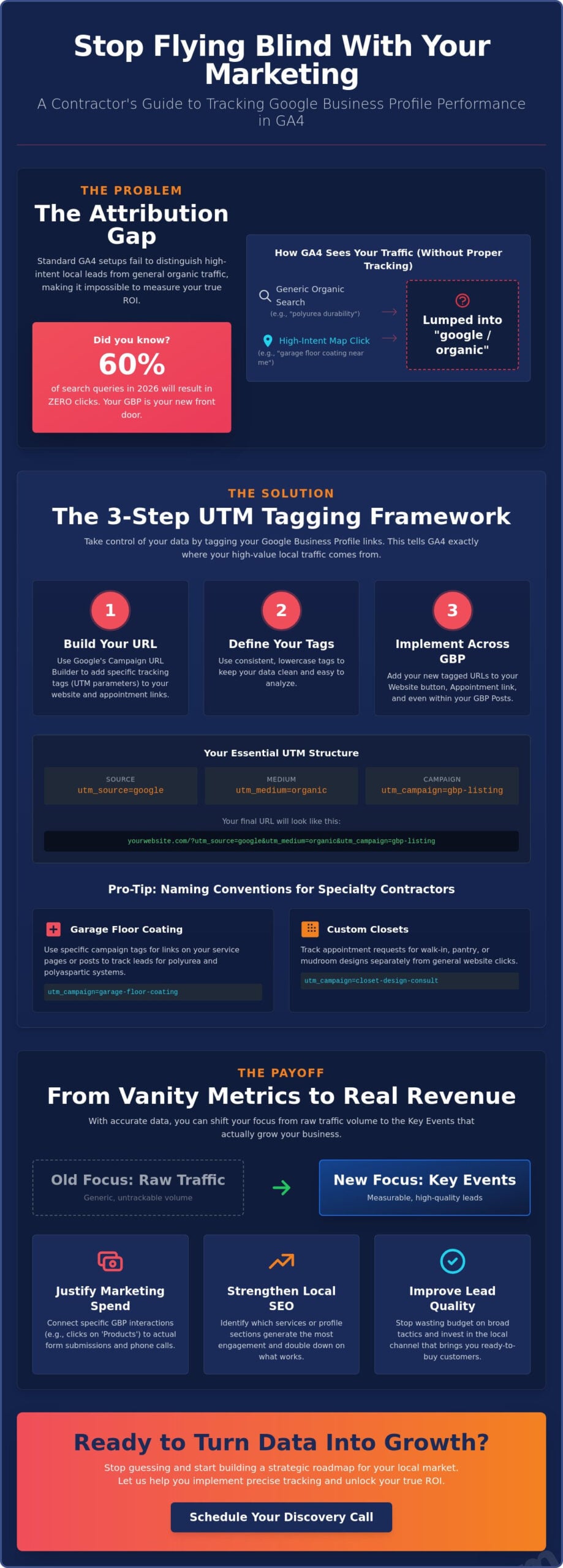
Did you know that 60% of search queries in 2026 result in zero clicks? For a specialty contractor, this means your Google Business Profile is often the first and only place a customer interacts with your brand before booking a consultation. It’s frustrating to see your phone ring or your inbox fill up without knowing if that lead came from your appointment link or a random organic search. If you aren’t accurately tracking gbp performance in ga4, you’re essentially flying blind with your marketing budget and missing the chance to see which services are truly driving growth.
You’ve likely felt the headache of staring at GA4’s complex interface, especially since industry data shows that 25% of setups still suffer from major data gaps. We believe you deserve a clear view of your ROI, one that proves whether your custom closet or polyurea flooring leads are actually coming from your local SEO efforts. You will learn how to use advanced UTM tagging and event tracking to attribute every conversion to the right source. This guide provides a straightforward path to turning GA4 into a decision-making tool that helps you stop wasting spend and start generating higher quality leads for your business.
Key Takeaways
- Stop letting your high-intent map traffic get lost in generic organic data by understanding why standard GA4 setups fail to attribute local leads correctly.
- Master a simple step-by-step framework for tracking gbp performance in ga4 using custom UTM parameters for your website and appointment links.
- Learn exactly where to find your profile data within the GA4 interface to isolate map-based interactions from general website visits.
- Shift your focus from raw traffic volume to “Key Events” like phone calls and form submissions to measure the actual quality of your leads.
- Discover how to turn these analytical insights into a strategic plan that strengthens your Local SEO and justifies every dollar of your marketing spend.
The Attribution Gap: Why Standard GA4 Tracking Fails Local Contractors
When you look at your marketing dashboard, you might see a steady stream of visitors listed under “google / organic.” For a concrete coating business or a custom closet firm, this usually looks like a win. There is a hidden problem that often goes unnoticed. Standard GA4 setups don’t distinguish between a homeowner who found your blog post about polyurea durability and a hot lead who clicked the “Website” button on your Google Business Profile after searching for “garage floor coating near me.” This attribution gap makes tracking gbp performance in ga4 nearly impossible without manual intervention.
We see many specialty contractors struggle with this lack of clarity. If you can’t tell the difference between a generic organic click and a high-intent map click, you can’t accurately measure your return on investment. You might be seeing leads for walk-in closets or pantry systems coming in, but without knowing if they clicked your “Website” link or your “Appointment” link on your profile, you’re essentially flying blind. This confusion often leads to poor budget allocation, where you might overspend on broad lead generation while neglecting the local profile that’s actually doing the heavy lifting.
The Map Pack vs. Traditional Organic Search
The Local Map Pack serves a very different intent than the standard list of search results. When someone searches for “custom closet designers,” they aren’t usually looking for a DIY guide; they’re looking for a local partner to transform their home. Proximity is the primary driver here. Web analytics principles teach us that capturing this specific intent is vital for high-ticket home services. Standard search results might attract researchers, but the Map Pack attracts buyers. If your data lumps these two groups together, you lose the ability to see how proximity-based searches are fueling your growth.
The Business Impact of Accurate Data
Accurate data changes how you lead your company. It helps you decide whether to invest more in your Local SEO or shift focus to standard content marketing. Perhaps your “Products” section featuring garage slatwall systems or overhead storage is getting more clicks than your main website link. If you can see that these specific interactions lead directly to “Request a Quote” form completions, you know exactly where to double down. It’s about moving beyond vanity metrics and connecting your GBP interactions to real revenue. By tracking gbp performance in ga4 with precision, you transform your analytics from a confusing spreadsheet into a strategic roadmap for your local market.
Implementing UTM Parameters for GBP: A Step-by-Step Framework
To fix the attribution gap we discussed, you need a way to tell GA4 exactly where your traffic is coming from. The most effective tool for this is the Google Campaign URL Builder. By attaching specific tags to your links, you can ensure that every click from your profile is categorized correctly. This is the foundation of tracking gbp performance in ga4 with accuracy. Without these tags, your map traffic remains invisible, buried under the general organic search category.
Consistency is vital when building these links. GA4 is case-sensitive, meaning it sees “gbp” and “GBP” as two entirely different campaigns. To keep your data clean, always use lowercase for your tags. Follow these UTM best practices to avoid fragmented reports that make analysis difficult. You should apply these unique links to your “Website” button, your “Appointment” link, and even your individual GBP posts. Use these three essential components for every link:
- Source: google
- Medium: organic
- Campaign: gbp-listing
Naming Conventions for Specialty Contractors
Generic tags won’t tell you which services are driving your business. If you offer multiple high-ticket items, use specific campaign names to differentiate them. For example, use “utm_campaign=garage-floor-coating” for links on your epoxy service pages. If you’re a custom closet designer, you might track “Closet Design Consultation” links separately from your general homepage. For multi-location businesses, including the city name in the campaign tag helps you see which local market is performing best. If you find the technical setup overwhelming, our team can help you audit your current tracking to ensure no lead goes uncounted.
Tracking GBP Products and Posts
Your profile is more than just a phone number and a link. It’s a digital showroom. Adding UTMs to your “Polyaspartic Systems” product cards allows you to see exactly how much interest these premium options generate. You should also measure the effectiveness of your “Recent Work” posts. When you share photos of a newly installed garage slatwall system or a walk-in closet, a trackable link tells you if those photos are actually driving traffic to your portfolio. These micro-interactions reveal high buyer intent. A customer clicking through a specific product card is much closer to a sale than someone just browsing your homepage. By tracking gbp performance in ga4 at this level, you gain the insights needed to optimize your profile for luxury organization and flooring systems.
Analyzing GBP Traffic Within the GA4 Interface
Once you’ve implemented your trackable links, the real magic happens inside the GA4 interface. You need to know exactly where to look to find the fruits of your labor. Start by navigating to the Reports menu on the left side. From there, select Acquisition and then click on Traffic acquisition. This report is your primary window into how people find your website. It might look overwhelming at first, but a few simple filters will bring your local data into clear focus.
By default, GA4 often groups your traffic into broad categories. To get specific, change the primary dimension of the table to “Session source/medium.” You will see “google / organic” as a major driver for your business. To isolate your profile traffic, click the blue “+” icon to add a secondary dimension. Search for and select “Session campaign.” Now, those specific tags you created, such as “gbp-listing” or “garage-floor-coating,” will appear in their own rows. This is the core of tracking gbp performance in ga4. It allows you to see exactly how many sessions were driven by your map presence versus traditional search results.
Don’t stop at just the source. Use the “Landing page” report to see where these local visitors arrive on your site. If a homeowner clicks a product card for polyurea systems, they should land on a page that highlights that specific benefit. If they’re landing on your homepage and leaving immediately, you might have a mismatch between their intent and your content. Monitoring these entry points helps you ensure your website is ready to catch the leads your profile generates.
Building a Custom GBP Audience
Creating a dedicated segment for GBP visitors allows for much deeper analysis. In the Admin section under “Audiences,” you can define a group based on your session campaign tag. This lets you compare the behavior of these local leads against your paid ad traffic. You might find that users looking for reach-in closets through your profile have a much lower bounce rate. Evaluating the “Average engagement time” for these specific visitors often proves that local searchers are more invested in your brand than the average browser.
Visualizing Local Performance in Explorations
For a more advanced view, head to the “Explore” tab and create a “Free-form” exploration. This tool lets you build a custom dashboard tailored to your specific goals. You can track the exact user journey from a GBP “Product” link for overhead storage all the way to your “Contact Us” page. Identifying where garage remodel leads drop off is vital for improving your conversion rate. This data driven approach ensures your tracking gbp performance in ga4 leads to actual business growth rather than just empty metrics.
Beyond Clicks: Measuring Lead Quality and Conversion
Raw traffic volume is often just a vanity metric. If thousands of people see your profile but none of them book a consultation for a polyaspartic floor coating, those numbers don’t help your bottom line. To grow your business, you must shift your focus toward “Key Events.” In GA4, these are the conversions that actually matter. You should prioritize setting up events for “Phone Call Clicks” and “Form Submissions” to see exactly how your profile contributes to your sales pipeline. When you’re tracking gbp performance in ga4, the goal is to move beyond the click and start measuring the intent behind the action.
Attributing a high-ticket inquiry back to the original GBP interaction is where many specialty contractors struggle. If a lead fills out a form for a full garage remodel after clicking your profile, you need to know that. This clarity allows you to justify your marketing spend and focus on the channels that work. There’s also a significant attribution gap to consider. Many customers find your business in the Map Pack and call you directly from their mobile device. GA4 can’t track these direct calls automatically because the user never hits your website. Recognizing this gap is the first step toward a more complete view of your local search ROI.
Defining “Qualified” Leads for Contractors
Not every interaction is a sales opportunity. A homeowner who downloads a “Pantry Design Guide” is likely in the research phase. Someone who clicks “Request a Quote” for a custom walk-in closet is ready to talk. GA4 allows you to track interest in specific services, like mudrooms versus reach-in solutions. This data helps you identify which parts of your business are attracting the most attention. It also prevents you from chasing low-margin floor coating jobs when your data shows a higher demand for premium polyurea systems. Focusing on lead quality ensures your team spends time on the projects that drive the most profit.
The Role of Call Tracking
Phone calls remain the primary conversion tool for garage cabinet sales and custom closet consultations. To capture the leads that GA4 misses, we suggest using Dynamic Number Insertion (DNI). This technology assigns unique phone numbers to different traffic sources, allowing you to attribute a call back to your GBP listing. When you integrate this call data with GA4, you bridge the gap between map interactions and offline sales. This integrated approach gives you the proof you need to scale your local SEO efforts confidently. If you’re ready to see the real impact of your digital presence, schedule a discovery call with Be Kind Local today.
Turning Data into Growth with Be Kind Local
Data is a tool, not a destination. For a specialty contractor, seeing numbers in a dashboard is only half the battle. You need to know what those numbers mean for your next installation and your overall profit margins. At Be Kind Local, we believe that tracking gbp performance in ga4 is the foundation of a much larger conversation about your business growth. We don’t just hand you a spreadsheet and walk away. We use these specific insights to continuously optimize your Local SEO and GBP listing, ensuring your brand stands out as the trusted authority in your local market.
Our goal is to move beyond the traditional vendor relationship. We want to be your strategic partner. This means providing transparent, conversion-focused reporting that shows you exactly how your garage floor coating or custom organization leads are generated. By bridging the gap between raw data and actionable strategy, we help you position your business as the premier choice for homeowners. Whether you’re installing high-performance polyaspartic systems or designing intricate pantry storage, your digital presence should reflect the quality of your craftsmanship and your commitment to the community.
Our Strategic Approach to Contractor Marketing
We focus on the metrics that actually move the needle. For a custom closet designer, 1,000 visitors to a generic blog post aren’t as valuable as five high-intent clicks for a walk-in closet consultation. We prioritize lead quality over raw traffic volume because we know your time is best spent on high-margin projects. This is where we integrate a deep Brand Strategy into your local search presence. We help you communicate your unique values, from your commitment to local talent to your expertise in mudroom and reach-in solutions. The Be Kind Local difference is rooted in ethical marketing that drives measurable ROI without the hype or fluff.
Next Steps for Your Digital Growth
It’s time to stop guessing where your leads are coming from. When you have a clear view of your data, you can make confident decisions about your company’s future. Preparing for a discovery call with our team is simple. Think about your current lead volume and where you want to see the most growth in the coming months. Are you looking to dominate the epoxy flooring market, or do you want to expand your reach with garage slatwall and overhead storage systems? Schedule your consultation to audit your advertising and SEO performance. Let’s work together to turn your tracking gbp performance in ga4 into a strategic roadmap for sustainable, local success.
Take Command of Your Local Lead Generation
Mastering the art of tracking gbp performance in ga4 turns your digital presence from a mystery into a measurable asset. By implementing a clean UTM framework and focusing on high-intent key events, you move past vanity metrics like raw clicks. You now have the power to see exactly how your polyurea flooring or custom closet leads find your brand. This clarity is what separates the local market leaders from the contractors who are simply guessing with their marketing spend.
We are specialists in floor coating and custom closet lead generation. We understand that your success depends on high-ticket ROI, not just raw traffic volume. Our conversion-focused Local SEO strategies and transparent reporting ensure you always know where your next project is coming from. It’s time to stop flying blind and start building a predictable growth engine for your local business. We are ready to help you bridge the gap between data and revenue.
Schedule your discovery call at bekindlocal.com to turn your GBP data into a lead-generating machine. We look forward to partnering with you on your journey toward sustainable growth.
Answers to Common Tracking Questions
How do I add UTM parameters to my Google Business Profile?
You add UTM parameters by replacing your standard website URL in the GBP dashboard with a tagged version created in the Google Campaign URL Builder. This process doesn’t change where the user lands; it simply adds a snippet of code that GA4 can read. You just copy the generated link and paste it into the “Website” or “Appointment” field of your profile to start collecting better data.
Will adding UTM tags to my GBP links hurt my local SEO rankings?
No, adding UTM tags to your links won’t hurt your local SEO rankings. Google’s algorithms recognize that these parameters are for tracking purposes and do not change the destination page or its authority. In fact, the insights you gain from tracking gbp performance in ga4 allow you to optimize your profile more effectively, which can lead to better visibility over time.
Why does GA4 show different numbers than my GBP Insights dashboard?
GA4 and GBP Insights show different numbers because they measure different actions. GBP Insights tracks every click on the “Website” button within the search results, while GA4 only counts a session if the user’s browser successfully loads your site and the tracking tag fires. Privacy settings and ad blockers often cause GA4 to report lower numbers than the Google Business Profile dashboard.
Can I track phone calls from my GBP in Google Analytics 4?
You can track phone calls in GA4 by setting up specific events for “tel:” link clicks on your website. For calls made directly from the Map Pack without visiting your site, you need a dynamic number insertion service. This allows you to attribute those offline conversations back to your local search efforts, giving you a complete view of your lead generation ROI.
What is the best UTM campaign name for a floor coating business?
The best UTM campaign name is one that clearly identifies the service and intent, such as “utm_campaign=epoxy-garage-floors.” If you are running a specific promotion for polyurea or polyaspartic systems, use a unique tag for those links. Consistency is the most important factor. Always use lowercase and hyphens to keep your data organized and easy to read in your reports.
How can I see which GBP post generated a lead in GA4?
You can see which GBP post generated a lead by adding a unique UTM campaign or content tag to the “Learn More” button of each individual post. For example, a post about a new walk-in closet installation could use “utm_campaign=walk-in-closet-portfolio.” When a lead converts, GA4 will show you exactly which post inspired them to reach out for a consultation.
Do I need a separate UTM link for each business location?
Yes, you should use a separate UTM link for each business location to accurately measure local performance. By including the city name in your campaign tag, like “gbp-listing-austin,” you can see which branch is driving the most high-ticket inquiries. This allows you to adjust your marketing strategy based on the specific needs and competition of each local market you serve.
How often should I check my GBP performance in GA4?
You should check your performance at least once a month to identify trends and ensure your tracking is working correctly. For specialty contractors, a quarterly deep dive is also helpful to see how seasonal changes affect demand for services like garage remodeling or pantry organization. Regular monitoring helps you stay ahead of the competition and refine your long term lead generation strategy.