
 951-249-7500
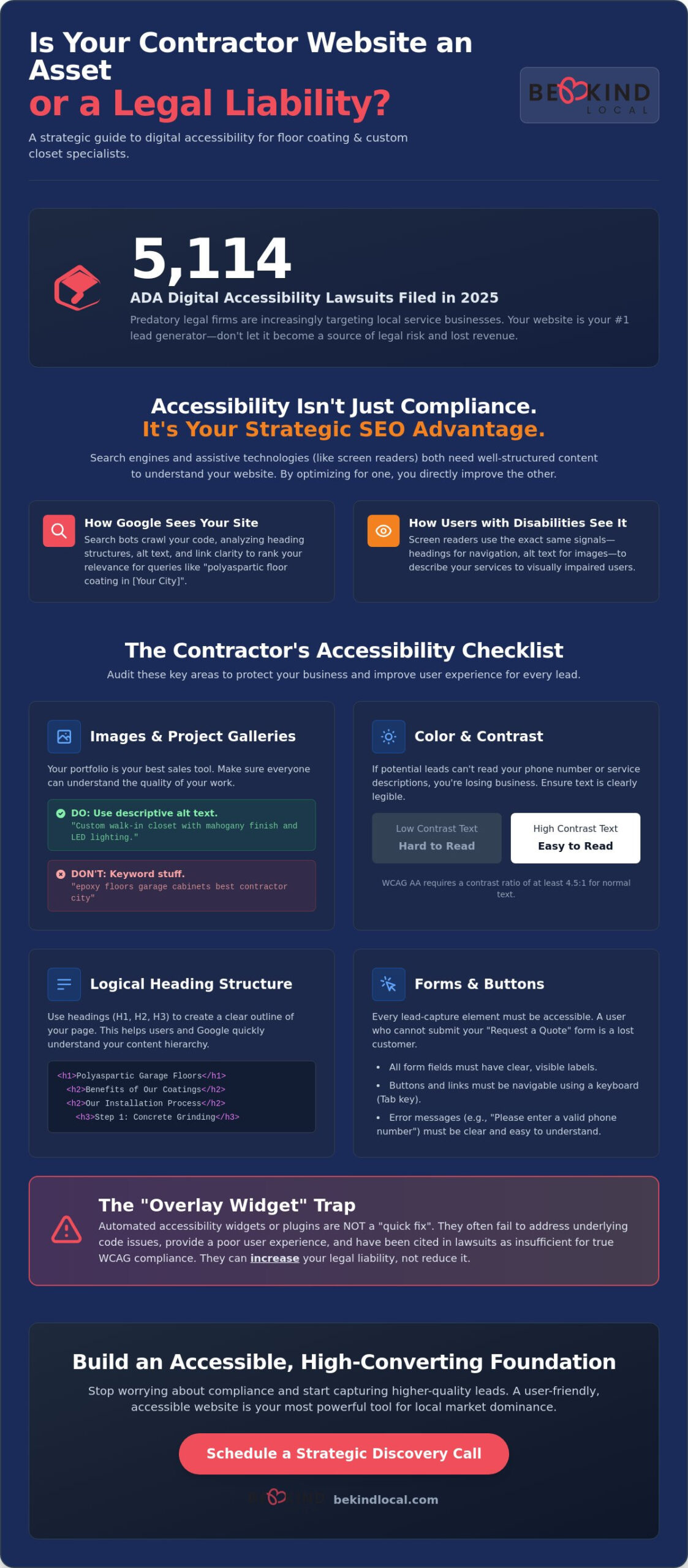
Did you know that in 2025, there were 5,114 ADA digital accessibility lawsuits filed across the U.S. alone? As a contractor specializing in epoxy floors or custom garage cabinets, your focus should be on the job site, not on decoding legal paperwork. It’s frustrating to feel like your website might be a liability rather than a lead generator. You’ve likely heard the buzz about WCAG versions and wondered if your site actually works for everyone. Using a practical website accessibility checklist for small business is the first step toward peace of mind and a more inclusive brand.
We believe in building digital spaces that reflect the same quality and care you put into a polyaspartic garage floor. This guide will show you how to protect your business from predatory lawsuits while simultaneously improving your local search rankings. By following this strategic checklist, you’ll learn to identify common pitfalls and fix them without the fluff or agency jargon. We’re going to break down the current 2026 standards so you can stop worrying about compliance and start capturing higher quality leads from a better user experience.
Key Takeaways
- Learn why accessibility is a strategic local SEO advantage that helps search engines index your concrete coating and closet service pages more effectively.
- Use this website accessibility checklist for small business to ensure your high-ticket project galleries and finish samples are perceivable by every potential lead.
- Understand the “Overlay Trap” and why automated widgets often increase legal liability instead of providing true WCAG compliance.
- Discover how to optimize lead capture forms and “Request a Quote” buttons to ensure no prospect is blocked from contacting your business.
- Shift your focus from raw traffic to lead quality by building an accessible foundation that prioritizes a seamless user experience for all local customers.
Why Website Accessibility is a Strategic Priority for Specialty Contractors
Small business owners often view digital compliance as a “nice to have” or a chore for an IT department. For specialty contractors in the epoxy flooring and custom closet industries, this mindset is a liability. The legal landscape shifted significantly in early 2026. In 2025 alone, there were 5,114 ADA digital accessibility lawsuits filed across the U.S. courts. These aren’t just targeting tech giants anymore. Local businesses are now in the crosshairs of predatory legal firms. Using a proactive website accessibility checklist for small business is the most effective way to shield your company from these risks while improving your bottom line.
Beyond the courtroom, accessibility is about market reach. Custom closet projects often cater to homeowners aged 50 and older. As we age, vision and motor skills naturally change. If your gallery of reach-in closets or pantry systems is hard to navigate, you’re losing leads before they even see your work. A site that follows the Web Content Accessibility Guidelines (WCAG) ensures that every potential customer, regardless of their physical abilities, can request a quote without friction. It’s about respect, ethics, and capturing every possible opportunity in your local market.
The Connection Between Accessibility and Local Search Visibility
Google’s search bots and screen readers share a common goal: they want to understand the structure and content of your page. When you use proper heading structures from H1 to H6, you aren’t just helping a visually impaired user. You’re telling Google exactly what your content is about. This clarity improves your relevance for high-intent queries like “polyaspartic floor coating [City]” or “garage slatwall systems.”
Alt text is another bridge between accessibility and SEO. When you describe an image of a walk-in closet with “custom walk-in closet with mahogany finish and LED lighting,” you help screen readers describe the photo to a user. Simultaneously, you’re helping your business appear in Google Image searches for those specific design ideas. Google prioritizes sites with high mobile usability and clear navigation paths. An accessible site is, by definition, a site that Google wants to show its users.
Protecting Your Reputation and Brand Equity
Your brand is your most valuable asset. Proactive compliance prevents you from falling into the cycle of predatory lawsuits that can drain your marketing budget and damage your reputation. Positioning your brand as inclusive shows your community that you care about every neighbor. This ethical stance builds trust faster than a competitor with a broken, frustrating website. For a deeper look at long-term growth, consider how this fits into your overall Home Service Brand Strategy. Building a foundation of trust today ensures your local dominance for years to come.
The Essential Small Business Website Accessibility Checklist
Moving from the “why” to the “how” requires a shift in perspective. You aren’t just checking boxes for a developer; you’re ensuring that a homeowner looking for a mudroom renovation or a garage overhaul can actually interact with your brand. A website accessibility checklist for small business should be practical and focused on the elements that drive your leads. If a potential client can’t read your service descriptions or navigate to your contact page, they’ll simply click away to a competitor who made it easy for them.
Images and Alt Text for Contractor Portfolios
Your project gallery is your strongest selling tool. Whether you’re showing off a polyaspartic garage floor or a custom reach-in closet, every image needs descriptive alt text. Avoid keyword stuffing like “epoxy floors city name.” Instead, use natural descriptions like “gray flake polyaspartic garage floor with high-gloss finish and tan slatwall systems.” This helps screen readers describe the quality of your work to visually impaired users. If you use “before and after” sliders, ensure they have text labels or captions. Screen readers often struggle with the sliding mechanism, so a clear text description ensures the transformation is understood by everyone. Never hide critical information, like your phone number or a seasonal discount, inside an image file where a computer can’t “read” it.
Color Contrast and Typography
Homeowners over the age of 50 are a primary demographic for high-end garage storage and custom pantry systems. As vision naturally changes with age, small font sizes and low-contrast text become significant barriers. Your “Request a Quote” buttons and primary navigation must have a minimum 4.5:1 contrast ratio against the background. Understanding your legal obligations under the ADA helps you see these design choices as standard business requirements. Don’t rely on color alone to convey information. For example, if a user misses a field on your lead form, don’t just turn the box red. Use a text label that clearly explains the error so everyone can fix it and move forward.
Keyboard Navigation and Focus States
Not everyone uses a mouse. Some users navigate using the “Tab” key or voice commands. You should be able to “Tab” through your entire site, from your homepage hero section down to the footer. Each link or button should have a visible “focus state,” which is usually a highlight or outline that shows the user where they are on the page. For sites with large menus featuring multiple closet types or flooring services, a “Skip to Content” link is a lifesaver. It allows users to jump past the navigation directly to the main info. If your mobile “hamburger” menu isn’t keyboard-accessible, you’re effectively locking out a portion of your local market. If you want to ensure your site is built on a foundation that prioritizes these details, you can connect with us for a strategy session to review your current digital presence.
Evaluating Accessibility Tools: Why Automated Overlays Aren’t Enough
Many contractors look for a “one-click” fix when they see the legal risks associated with a non-compliant site. It’s tempting to install a cheap accessibility widget or overlay and assume the problem is solved. This is what we call the “Overlay Trap.” These tools act as a temporary bandage rather than a cure. Research from early 2025 shows that 22.64% of all web accessibility lawsuits were filed against websites that already had accessibility widgets or overlays installed. Instead of protecting you, these tools often signal to predatory legal firms that your site has underlying code issues you’re trying to hide.
The reality is that AI cannot fix everything. While automated tools are helpful for an initial audit, they consistently miss about 70% of accessibility barriers. A truly effective website accessibility checklist for small business requires a deeper look at your site’s foundation. Relying on a patch is a gamble with your brand equity. Following the DOJ Guidance on Web Accessibility means addressing the source code directly, ensuring your site is perceivable and operable for everyone from the ground up.
The Limitations of AI Accessibility Widgets
Screen reader users often find these overlays intrusive. Instead of helping, the widgets can conflict with the user’s own assistive software, making the site completely unusable. These tools don’t fix your polyurea floor gallery’s broken alt text or your mudroom lead form’s missing labels in the actual code. They just try to layer a fix on top. If the widget fails to load, your site remains non-compliant. High-profile lawsuits have proven that courts don’t accept these widgets as a valid defense when a site remains functionally inaccessible to a person with a disability.
A Hybrid Approach to Long-Term Compliance
Strategic growth requires a balance of automation and human oversight. You can use free tools like WAVE or Google Lighthouse to catch low-hanging fruit, such as missing headers or poor color contrast. These are great for ongoing monitoring when you add new blog posts about garage slatwall systems or overhead storage. However, complex elements like a custom reach-in closet configurator or an interactive service area map require manual testing.
We recommend training your team on basic accessibility SEO practices to ensure every new piece of content is born compliant. This hybrid approach ensures that your high-ticket lead generation forms never block a prospect. It moves your business away from reactive patches and toward a sustainable, inclusive digital presence that builds genuine trust with every local homeowner.
How to Implement Accessibility Improvements for High-Ticket Lead Gen
Fixing every single page on your site might feel overwhelming. When applying a website accessibility checklist for small business, the most efficient approach is to prioritize the pages that actually drive your revenue. Start with your homepage, your primary service pages, like those for polyurea floor coatings or walk-in closet design, and your contact page. These are the high-traffic areas where a single accessibility barrier can cost you a five-figure project. By ensuring these core pages are functional for everyone, you maximize your lead quality without getting bogged down in low-impact technical details.
The goal isn’t just to stay compliant; it’s to make it easy for people to hire you. If your lead capture form is confusing, you’re essentially leaving money on the table. This is especially true when you are trying to generate high-intent floor coating leads. Every friction point you remove increases the likelihood of a homeowner completing their inquiry. Accessibility and conversion rate optimization are two sides of the same coin.
Optimizing the Lead Funnel for Accessibility
Lead generation forms are often the most broken part of a contractor’s website. Placeholder text, the light gray text inside the box, often disappears when a user starts typing, which can be confusing for those with cognitive disabilities. Instead, use clear, permanent labels above each field. For example, use “Square Footage of Garage” or “Type of Closet System” rather than generic prompts. This ensures the user always knows what information you need. Additionally, ensure your error messages are specific. If a phone number is missing a digit, tell the user exactly that, rather than just highlighting the box in red. Providing multiple ways to connect, such as a direct phone number and an accessible email link, ensures that no prospect is left behind because of a technical hurdle.
Accessibility in Visual Content Marketing
Your marketing materials should be as accessible as your website. If you share “Day in the Life” installation videos showing a garage slatwall system or a mudroom transformation on social media, always include captions. Many homeowners watch these videos in public or without sound, and captions are vital for those with hearing impairments. Similarly, if you offer downloadable PDF brochures for pantry systems or overhead storage, ensure they are tagged for accessibility so screen readers can interpret the text and images properly. Finally, avoid using “Click Here” for your links. Use descriptive text like “View our custom closet portfolio” or “Request a garage coating quote.” This tells both the user and search engines exactly where the link leads, improving both usability and SEO. To see how your current site stacks up against these standards, you can schedule a discovery call with our team today.
Building an Accessible, High-Converting Foundation with Be Kind Local
A website accessibility checklist for small business is a valuable starting point, but checking boxes is only half the battle. Real growth happens when these standards are baked into your business DNA. At Be Kind Local, we don’t treat accessibility as an afterthought or a separate technical service. It’s a fundamental part of our Custom Website Design process. We believe that an ethical business is a successful business. That means ensuring every homeowner in your service area can experience the quality of your craft through their screen, regardless of how they navigate the web.
Our “Lead Quality Over Volume” philosophy means we focus on making your site a high-performing asset for your most profitable services. Whether you’re selling premium polyaspartic garage floor systems or high-end walk-in closets, your digital presence should reflect your expertise. A generic web vendor might give you a pretty site that fails a screen reader test or lacks keyboard focus states. As a strategic partner, we ensure your site is robust, understandable, and ready to convert the leads your competitors are accidentally ignoring because of a poor user experience.
Strategic Web Design for Floor Coating and Closet Pros
Our process begins with a deep dive into your current digital footprint. We audit your existing contractor site to identify exactly where you’re losing potential leads for mudroom renovations or reach-in closet projects. We don’t just look for errors; we look for opportunities to improve the user journey. Balancing high-end aesthetics with strict compliance is an art form. We use high-contrast color palettes that match your brand and descriptive text that highlights your craftsmanship. By integrating your Advertising efforts with accessible landing pages, we help you achieve a higher ROI. Your PPC dollars go further when every click has a clear, unblocked path to your “Request a Quote” form.
Schedule Your Strategic Discovery Call
Stop guessing about your site’s performance or your level of legal risk. You’ve seen the data on lawsuits and the benefits for local SEO. Now, it’s time to move from a manual website accessibility checklist for small business to a fully optimized, inclusive digital foundation. Let’s build a roadmap for your growth that prioritizes lead quality and community trust. We’re ready to help you position your specialty contracting business as the local leader in both quality and care. We invite you to schedule your discovery call today at bekindlocal.com. Let’s discuss how to turn your website into your hardest-working salesperson.
Secure Your Local Market Dominance
Choosing to prioritize accessibility is a strategic move that sets your business apart as an ethical leader in your community. It’s about more than just avoiding legal risk; it’s about ensuring every homeowner can easily find and hire you for their next garage transformation or custom closet project. By applying a website accessibility checklist for small business, you build a foundation that supports both long-term SEO and a superior user experience. You’ve learned that quick fixes like overlays are no substitute for a well-built, inclusive site that truly represents the quality of your work.
Our experienced team specializes in the floor coating and custom closet industries, acting as a strategic partner rather than a simple vendor. We focus on lead quality over raw traffic volume, using an ethical approach to help you grow sustainably. Ready to build a website that protects your business and converts more leads? Schedule your Discovery Call with Be Kind Local today. We look forward to helping you create a digital presence that welcomes every neighbor and drives real results for your business.
Frequently Asked Questions
Is website accessibility a legal requirement for small businesses in 2026?
Yes, website accessibility is a legal requirement under ADA Title III for businesses considered “public accommodations.” The Department of Justice reinforced these expectations in early 2026. For specialty contractors, your digital presence is your storefront. Failing to meet WCAG standards exposes you to lawsuits and limits your ability to serve the 25% of U.S. adults living with disabilities. Proactive compliance is the only way to safeguard your brand and ensure equal access.
How does website accessibility affect my Local SEO and Google rankings?
Accessibility and Local SEO are deeply linked. Google’s algorithms prioritize sites with clean structures, descriptive alt text, and high mobile usability. When you follow a website accessibility checklist for small business, you’re creating a site that search bots can crawl more effectively. Proper heading hierarchies for your garage cabinet and polyurea coating pages help Google understand your service relevance in specific cities, directly boosting your local visibility and search rankings.
Do I need to hire a developer to make my garage remodeling site accessible?
While you can handle basic content updates like alt text yourself, deep technical accessibility often requires a specialist. Elements like keyboard navigation and focus states live in your site’s source code. A specialized partner ensures these features don’t break during your next garage remodeling gallery update. Investing in a professional audit prevents the “patchwork” approach that often leads to more technical debt and legal vulnerabilities down the road for your business.
What is the difference between WCAG 2.1 and ADA compliance for websites?
The ADA is the law that mandates equal access, while WCAG 2.1 AA is the set of technical guidelines used to measure that access. Think of the ADA as the building code and WCAG as the specific blueprint for your digital ramps and wide doorways. Most courts currently recognize WCAG 2.1 Level AA as the standard for compliance. Meeting these guidelines provides a solid defense against claims that your site is discriminatory toward users.
Will making my site accessible ruin my high-end design aesthetic?
Not at all. High-end design and accessibility actually go hand in hand. Strategic design uses clear contrast and generous white space, which looks modern and professional. You can still showcase beautiful walk-in closet portfolios and sleek epoxy floor finishes while maintaining a 4.5:1 contrast ratio. Accessible design is simply good design that prioritizes clarity and ease of use, ensuring your premium brand feels welcoming and professional to every potential customer in your market.
How often should I audit my custom closet website for accessibility issues?
You should perform a basic check every time you add new content, like a blog post or a new custom closet project gallery. A comprehensive, professional audit is recommended at least once a year. Digital standards and browser technologies evolve quickly. Regular monitoring ensures that a new plugin or theme update hasn’t accidentally blocked users from your “Request a Quote” form or broken the navigation structure of your pantry system pages.
Can I just use a plugin to make my website ADA compliant?
No, relying solely on a plugin or “overlay” widget is a significant risk. These tools often fail to fix the underlying code and can even interfere with screen readers. Data from 2025 shows that over 22% of accessibility lawsuits targeted sites that had these widgets installed. True compliance requires fixing the core code of your site to ensure it’s perceivable and operable for everyone without the need for a third-party patch that might fail.
What are the most common accessibility mistakes home service contractors make?
The most frequent errors include missing alt text on project photos and using non-descriptive link text like “Click Here.” Many contractors also use forms that rely on placeholder text rather than permanent labels, which confuses users. Using a website accessibility checklist for small business helps you avoid these pitfalls. These small mistakes often block high-intent leads from contacting you about their garage slatwall or pantry system projects, directly hurting your conversion rates.