
 951-249-7500
Nearly half of all local businesses are now receiving direct appointment requests through their search listings, yet many floor coating and closet professionals still rely on the “leave a message” gamble. For a specialist installing a polyaspartic system or designing a custom reach-in closet, every missed call is a missed opportunity to help a local homeowner. When you enable booking feature on google business profile, you transform your listing from a static map pin into a 24/7 lead generation machine. It’s a practical way to respect your own time while making it effortless for your community to reach out.
We understand the frustration of manual scheduling and the exhaustion of phone tag that often leads to low-quality inquiries. You deserve to work with partners who value your craft, not just those looking for a quick estimate. This guide will teach you how to set up a functional booking button that filters for high-quality consultation requests. We’ll explore the best software integrations for 2026 and show you how to streamline your local search presence for better conversions and a more professional digital handshake.
Key Takeaways
- Capture high-intent leads instantly by meeting the “speed to lead” expectations of modern homeowners searching for epoxy flooring or custom closet solutions.
- Learn the precise steps to enable booking feature on google business profile and choose between native “Reserve with Google” integrations or direct appointment links.
- Protect your production schedule by selecting CRM software that supports buffer times, geographic zoning, and deposit integration for high-ticket installations.
- Improve your local search rankings by leveraging booking engagement signals that demonstrate your profile’s relevance and authority to Google.
- Sync your booking data with your advertising efforts to accurately track ROI and focus your budget on the highest-quality consultation requests.
Why GBP Booking is a Strategic Asset for Flooring and Closet Professionals
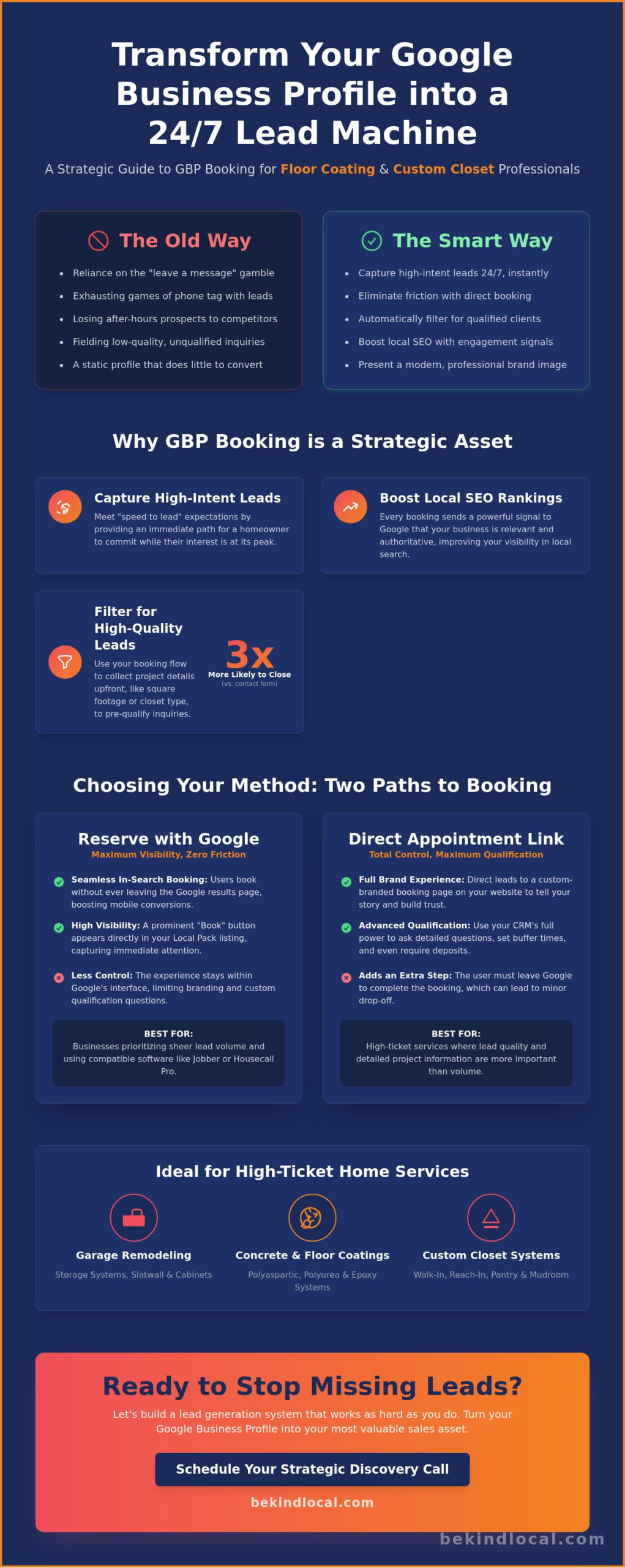
In the high-ticket world of home services, the first contractor to respond is often the one who wins the contract. Homeowners searching for an “epoxy garage floor coating near me” aren’t just browsing; they’re looking for a solution to a problem they’ve finally decided to solve. When you enable booking feature on google business profile, you effectively eliminate the friction of a phone call. You provide an immediate path for a lead to commit to your services while their intent is at its peak. This “speed to lead” isn’t just about being fast. It’s about being available when your competitors are still checking their morning voicemails.
Beyond the immediate conversion, this feature serves as a powerful signal for your broader local seo strategy. Google prioritizes profiles that show high levels of user interaction. Every time a potential client clicks that booking button, they’re telling the search engine that your business is the most relevant answer to their query. As a core tool within the broader ecosystem of a Google Business Profile, the booking feature positions your brand as a modern, tech-forward leader in the local garage remodel and home organization market. It shows you value the customer’s time as much as your own.
The Shift in Buyer Behavior for Home Organization
Modern homeowners, especially those looking for premium walk-in or reach-in closet upgrades, often do their research late at night. They’ve spent the evening looking at pantry organization ideas and are ready to take the next step. If your business requires a phone call during 9-to-5 hours, you’ve already lost the lead to someone with a “Book Design Consultation” button. Capturing these after-hours searchers is a critical component of a successful custom closet marketing funnel. It allows the prospect to feel a sense of accomplishment by securing a spot on your calendar without ever picking up the phone.
Quality Over Quantity: Filtering Your Leads
A common fear among contractors is that an open booking button will invite tire-kickers. In reality, a well-configured booking flow acts as a high-level filter. You can use the process to collect essential project details, such as estimated square footage for a polyurea or polyaspartic system installation. By asking for the closet type or the current state of a garage floor, you’re vetting the lead before you even see the notification. Statistics from early 2026 suggest that a scheduled estimate is roughly 3x more likely to close than a generic contact form submission. The commitment of choosing a time slot transforms a casual inquirer into a serious partner in the design process.
Reserve with Google vs. Appointment Links: Choosing Your Method
Choosing how to enable booking feature on google business profile depends on your specific sales flow. You can either use the native “Reserve with Google” integration or a custom “Appointment Link.” For a garage storage company or a floor coating specialist, this choice isn’t just about technical setup. It’s about how much control you need during the very first interaction with a potential client. One path focuses on a zero-friction experience; the other prioritizes lead qualification and brand consistency.
The native Reserve with Google feature is an official partnership between Google and specific scheduling providers. It allows users to book an estimate without leaving the search results page. This is incredibly effective for mobile traffic where extra steps often lead to lost leads. However, because the experience stays within the Google interface, you lose the chance to showcase your unique brand story. If your strategy relies on explaining the durability of polyurea coatings versus standard epoxy before a lead is even generated, this native method might feel a bit too restrictive.
When to Use Reserve with Google
This method is ideal for businesses that already rely on compatible software like Jobber or Housecall Pro. It gives you a massive visibility advantage in the mobile Local Pack because the “Book” button is highly prominent. It’s the right choice if your primary goal is sheer lead volume and you have a solid system for immediate follow-up. Just keep in mind that you’ll have less control over custom form fields. You might not be able to ask if they’re looking for a pantry, a mudroom, or a full reach-in closet redesign before they secure a spot on your calendar.
The Power of the Custom Appointment Link
For many high-ticket contractors, the custom appointment link is the strategic winner. By directing users to a dedicated landing page on your site, you can use specialized intake forms to vet every inquiry. This is a core part of effective floor coating leads management. You can ask for garage dimensions or the current condition of the concrete surface. This ensures your designers arrive prepared for a serious consultation. If you’re unsure which method fits your current growth stage, we can review your digital strategy together to find the best fit. Using your own link also allows for precise conversion tracking, giving you a clearer picture of your actual marketing ROI.
Selecting Scheduling Software for High-Ticket Home Services
Choosing the right platform is more than a technical hurdle; it’s about protecting your time and your profit margins. For a specialist installing polyaspartic systems or designing a custom reach-in closet, a generic calendar won’t cut it. You need a system that understands the logistics of a job site. This is where features like geographic zoning and buffer times become essential. Without them, you might find yourself booked for a garage coating estimate in the north and a pantry design consultation in the south with only ten minutes to travel between them. A strategic scheduler acts as a filter, ensuring your designers and technicians are always where they need to be without the stress of a cramped schedule.
Your choice of software must also support your broader growth goals. By integrating your scheduler with your advertising efforts, you can track which lead sources actually result in confirmed consultations. It’s not enough to know how many people clicked an ad; you need to know who committed to a time slot. When you enable booking feature on google business profile, the software you choose becomes the digital handshake of your brand. Automated SMS and email reminders are non-negotiable here. They significantly reduce no-show rates for in-home estimates, respecting the ethical commitment you make to your local community by showing up prepared and on time.
Mapping the Design Consultation Workflow
A successful booking flow should mirror your physical sales process. Start by setting up specific consultation types, such as “Walk-in Closet Design” or “Garage Slatwall System Planning.” This allows you to allocate the right amount of time for each visit. We recommend allowing prospects to upload photos of their current space during the booking process. Seeing the current state of a garage floor or a cluttered reach-in closet helps your team prepare a more accurate initial vision. Once the booking is complete, automate a “thank you” sequence that shares your brand’s values and previous local success stories to build trust before you even arrive.
Technical Integration Requirements
To use the native “Book” button, your platform must be a Google-supported provider. Industry leaders like Jobber and Housecall Pro offer seamless integration, but you should also consider how the API interacts with your web design. The interface must be perfectly mobile-responsive. Most homeowners will enable booking feature on google business profile interactions while on their phones, so a clunky, non-responsive calendar will kill your conversion rate. Ensure the platform allows for deposit integration if you require a commitment fee for high-end design consultations, as this further vets the lead’s intent.
Step-by-Step: Enabling and Optimizing Your Booking Feature
Setting up your digital calendar is a straightforward process, but it requires precision to ensure a seamless experience for your prospects. Start by signing into the Google account associated with your business. You can access your dashboard by searching for your business name directly on Google or through the Business Profile Manager. Once you’re in the management interface, look for the “Booking” or “Appointments” tab. This menu item’s location can vary slightly depending on whether you’re viewing the dashboard on a desktop or mobile device, but it’s the primary gateway to enable booking feature on google business profile for your company.
After you click into the booking section, you’ll be prompted to either select a third-party provider or input a custom URL. If you’re using a supported CRM like Jobber or Housecall Pro, Google will often detect this and offer a native integration. If you’ve decided on a custom approach to better qualify leads for high-end closet designs or polyaspartic garage floor projects, this is where you’ll paste your optimized landing page link. The “Check-In” period is the critical 24-hour window for estimate confirmation where you must verify the appointment details to prevent the lead from losing interest. Once the link is live, test the journey yourself. Open your profile on both a smartphone and a laptop to ensure the button is visible and the transition to your scheduler is fast and intuitive.
Optimizing the Conversion Path
The text on your button matters. For high-ticket services like a walk-in closet remodel, “Schedule Free Estimate” often performs better than “Book Now” because it feels lower pressure for the homeowner. Keep your intake form fields to the absolute essentials. Asking for a name, phone number, and the type of project (pantry, mudroom, or garage) is usually enough to start the conversation. You can also leverage “Local Justifications” by ensuring your profile mentions that you offer online appointments. This small snippet can appear in search results, giving you a competitive edge in the Local Pack.
Troubleshooting Common GBP Booking Issues
Sometimes the “Booking” tab might be missing from your dashboard. This usually happens if your primary category isn’t recognized as a service-based trade. Ensure your primary category is set correctly to “Flooring contractor,” “Cabinet maker,” or “Interior designer.” If you see conflicts between multiple third-party apps, you’ll need to go into the settings of the app you don’t want to use and disconnect the Google integration. If you’re ready to optimize your lead flow and need help navigating these technical hurdles, our team can help ensure your profile is fully functional and conversion-ready.
Integrating Booking into a Holistic Local SEO Strategy
A functional booking button isn’t just a convenience for your clients; it’s a powerful signal to Google’s ranking algorithm. When potential leads interact with your profile to schedule a consultation for a garage slatwall system or a polyaspartic floor coating, those engagement signals tell Google your business is highly relevant to the local market. This interaction data helps solidify your position in the Local Pack. If you enable booking feature on google business profile, you’re not just making life easier for homeowners. You’re actively building the authority of your listing by proving that people find your services valuable enough to take immediate action.
This technical optimization works best when it’s aligned with a clear brand strategy. Your booking experience is often the first real interaction a prospect has with your business operations. If the transition from your photos of pristine walk-in closets to your calendar is smooth and professional, it reinforces the quality of your craft. However, keep in mind that the booking feature is only one piece of a comprehensive home service brand strategy. It must work in harmony with your local content, your review profile, and your overall digital presence to turn searchers into long-term partners.
Leveraging Social Proof Alongside Bookings
Trust is the currency of the home service industry. You can maximize the impact of your booking link by ensuring your 5-star reviews are prominently displayed nearby. Use your Google Business Profile posts to highlight your “Instant Estimate” availability, showing photos of recently finished garage remodels to pique interest. We’ve seen great success when contractors encourage satisfied clients to specifically mention the “easy booking process” in their reviews. This type of social proof reduces anxiety for the next prospect who is on the fence about scheduling a design consultation.
Measuring Success: Leads, Not Just Clicks
To truly understand your growth, you must look past simple click-through rates. Use your profile insights to track how many people actually complete the booking process. Analyzing your cost-per-booked-appointment provides a much clearer picture of your ROI than measuring raw traffic. This data allows you to refine your local keyword targeting and adjust your ad spend to focus on the neighborhoods where you’re seeing the highest conversion rates. If you’re ready to dominate your local market and want a partner who focuses on lead quality over fluff, we’re here to help you scale your floor coating or closet business with precision.
Start Capturing High-Intent Leads Today
Modern homeowners expect the same convenience from their garage remodeler or closet designer that they get from every other premium service in 2026. By choosing to enable booking feature on google business profile, you remove the friction that often kills a sale before it even begins. You aren’t just adding a button; you’re building a strategic filter that prioritizes lead quality over raw traffic volume. This approach ensures your designers spend their time on serious consultations for walk-in closets or polyaspartic floor systems rather than chasing dead-end phone leads. It’s a simple change that respects both your time and the customer’s journey.
At Be Kind Local, we bring specialized expertise in flooring and closet marketing with a proven track record in Local SEO for contractors. We understand that your growth depends on qualified inquiries, not just website clicks. Schedule your discovery call with Be Kind Local to optimize your lead generation and see how a specialized partner can elevate your digital presence. Your craft deserves to be discovered by the right people at the right time. Let’s work together to build a community around your brand and reach your local goals.
Frequently Asked Questions
Is the Google Business Profile booking feature free to use?
Google doesn’t charge a fee to enable the booking feature on your listing. It’s a built-in tool designed to help local service providers connect with homeowners. However, you’ll likely incur costs from the third-party scheduling software you choose to integrate. Most professional platforms for contractors, like Jobber or Housecall Pro, require a monthly subscription to manage these automated design consultations and estimate requests effectively.
Can I use a custom booking link if I do not use a Google-partnered CRM?
You’re absolutely able to use a custom link even without a partnered software provider. By adding a direct URL to the “Appointments” field, you can send prospects to a specialized landing page on your own site. This is a smart way to enable booking feature on google business profile while maintaining control over your intake forms. It allows you to ask specific questions about garage dimensions or closet types before the lead is confirmed.
Will enabling the booking button help my business rank higher in the Local Pack?
Enabling the booking button doesn’t provide an automatic ranking jump, but the resulting engagement signals are highly valuable. When homeowners click to schedule a polyaspartic floor estimate, it tells Google your profile is relevant and helpful. This increased interaction often leads to better visibility in the Local Pack over time. High engagement rates are a key metric for long-term SEO success in competitive markets like garage remodeling and custom home organization.
Can I require a deposit through the Google Business Profile booking feature?
Google doesn’t process payments directly, but you can require deposits if your integrated scheduling platform supports that feature. When a lead clicks to book a high-end closet design consultation, they’ll be directed through your software’s checkout flow. This is an excellent way to vet high-intent leads and ensure your designers aren’t wasting time on uncommitted inquiries. Check your CRM settings to see if payment integration is available for your specific plan.
What if I only want to offer bookings for specific services like polyaspartic coatings?
You have full control over which services appear if you use a custom appointment link or a flexible scheduling platform. You can create a dedicated landing page that only offers consultations for polyaspartic coatings or walk-in closet systems. This prevents you from being booked for smaller, less profitable jobs that don’t fit your business model. It’s about being strategic with your time and focusing on the high-ticket projects that drive your growth.
How do I remove the “Book” button if it was added automatically by a third party?
To remove an unwanted button, you usually need to disable the integration within the settings of the third-party app that created it. Google often pulls this data automatically from partnered CRMs. If a “Book” button appears without your permission, log into your scheduling software and look for “Reserve with Google” settings. Turning this off there will typically remove the button from your profile within 24 to 48 hours.
Does the booking feature work for Service Area Businesses (SABs) without a physical office?
Service Area Businesses can absolutely use this feature even without a public physical office address. This is a critical tool for epoxy flooring contractors and garage remodelers who perform all their work at the customer’s location. It’s one of the smartest ways to enable booking feature on google business profile for your mobile trade. It levels the playing field, allowing you to capture leads directly from search results just like a traditional showroom would.
Can I manage multiple staff calendars through the GBP booking integration?
Managing multiple staff calendars is a standard feature for most professional-grade scheduling platforms that sync with Google. While the interface on your profile looks simple to the user, your backend software handles the complex task of checking individual designer or technician availability. This ensures you never double-book a pantry design or a garage floor estimate. All updates made in your CRM will reflect on your profile in real-time.