
 951-249-7500
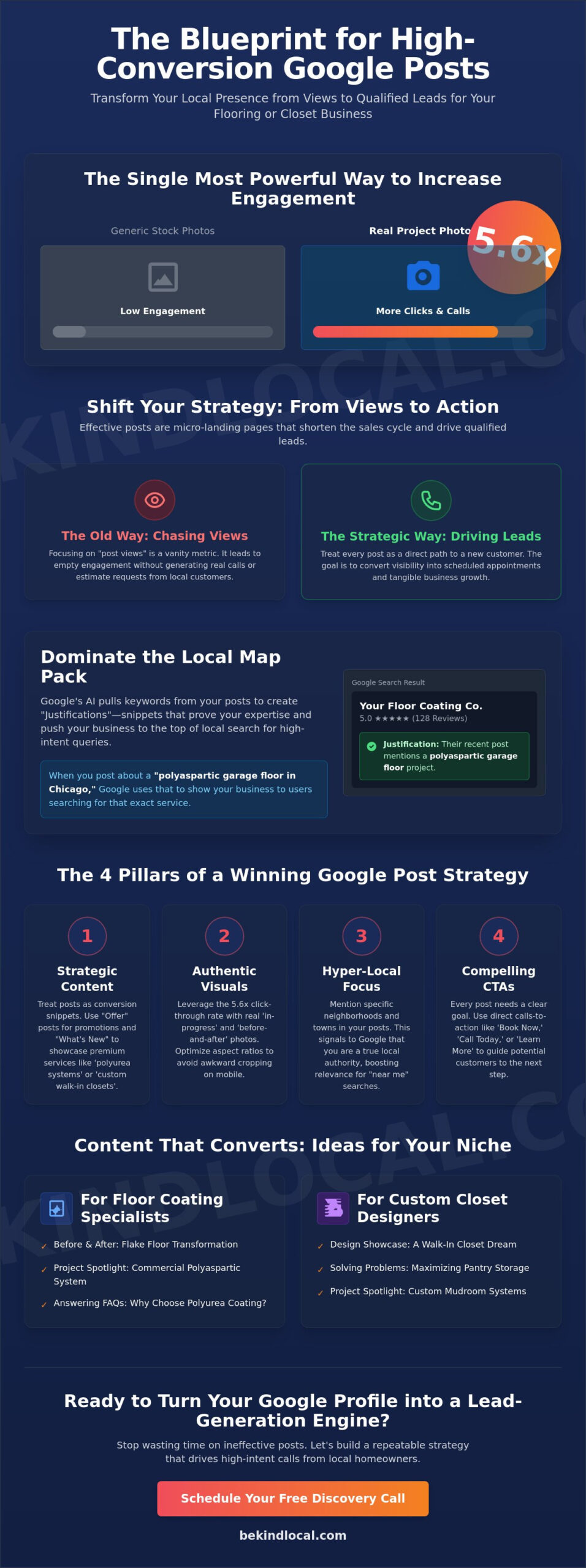
Did you know that Google Posts featuring real project photos get 5.6 times more clicks than those using generic stock images? Most garage remodelers and closet designers treat Google like a secondary social media platform, posting occasionally and wondering why the phone isn’t ringing. It’s frustrating to invest time into content that feels like it’s shouting into a void, especially when lead costs on other platforms continue to rise. You know your polyaspartic floor coatings and custom mudroom systems are the best in the area, but your local map pack presence needs to reflect that level of craftsmanship and care.
Learning how to use google posts effectively isn’t about chasing vanity metrics; it’s about building micro-landing pages that bridge the gap between a search and a scheduled estimate. We’ll show you how to transform your profile into a high-intent lead engine that drives actual calls rather than empty views. This guide previews the latest 2026 technical standards, from 30 second video limits to the influence of AI overviews, giving you a repeatable strategy to grow your business and serve your community with honesty.
Key Takeaways
- Understand how Google Posts act as high-intent conversion snippets that trigger “justifications” in the Local Map Pack, helping you show up for specific flooring and closet queries.
- Discover how to use google posts effectively by choosing between “What’s New” and “Offer” posts to highlight premium services like polyaspartic coatings or reach-in closet designs.
- Learn why authentic “in-progress” project photos outperform stock photography and how to optimize your image aspect ratios to prevent awkward cropping on mobile devices.
- Identify industry-specific content strategies that address common homeowner pain points, such as pantry clutter or garage organization, to move prospects through the sales funnel.
- Transition from basic automated posting to a strategic storytelling model that integrates with your overall local SEO and lead-generation ecosystem.
Beyond the Basics: Why Google Posts are Critical for Local SEO in 2026
Google Posts are often misunderstood as a digital bulletin board. In reality, they’ve evolved into high-intent conversion snippets that live directly within the Local Map Pack. For a garage remodeler or a custom closet designer, these posts act as micro-ads that capture a homeowner’s attention at the exact moment they’re ready to buy. Since Google’s small business initiatives began prioritizing local transparency, the platform has moved toward rewarding businesses that provide specific, real-world proof of their work. We believe in showing, not just telling, and your posts are the perfect stage for that honesty.
In 2026, the game has changed. Google’s AI now extracts granular details from your posts to validate your expertise. If you post about a “reach-in closet installation in Chicago,” the search engine uses that data to verify you actually perform that service in that specific location. This is why you must treat your updates as strategic assets rather than casual social media filler. It’s about being a helpful guide for your neighbors while ensuring the search engine understands your craft.
How Google Posts Influence the Local Map Pack
Have you ever noticed those small snippets in search results that say “Their website mentions…” or “Provides…”? These are called justifications. When you learn how to use google posts effectively, you’re essentially feeding the algorithm the exact keywords it needs to display these snippets. If a prospect searches for “polyaspartic garage floors,” and you’ve recently posted a photo of a finished polyurea system, Google is much more likely to pull your profile to the top. It’s a simple, powerful way to stand out.
Local relevance is built through these city-specific highlights. Mentioning a specific neighborhood or a local project doesn’t just show you’re active; it signals to Google that you are a trusted local authority. Frequency matters too. While “What’s New” posts now stay visible for up to six months, maintaining a fresh stream of content tells the algorithm that your business is thriving and responsive. It shows you care about your digital presence as much as your physical craftsmanship.
Moving from Brand Awareness to Direct Lead Generation
It’s easy to get distracted by “post views.” For specialty contractors, these are often vanity metrics. A thousand views don’t matter if they don’t result in a discovery call. The true value of a post lies in shortening the customer’s research phase. Instead of clicking through five different pages on your website, a well-crafted post provides the “before and after” proof and a direct call-to-action in one glance. You’re making the decision easy for them.
To see real growth, you have to integrate these snippets into a broader Local SEO strategy. This isn’t just about showing up; it’s about converting that visibility into a lead-generation engine. By understanding how to use google posts effectively, you move from being another name on a list to being the obvious choice for high-ticket services like custom pantry organization or overhead garage storage. You aren’t just selling a service; you’re offering a solution to a neighbor’s problem.
The 4 Pillars of a High-Conversion Google Post Strategy
Stop thinking of Google Posts as a digital bulletin board. To master how to use google posts effectively, you must view each update as a strategic entry point into your sales funnel. The U.S. Small Business Administration notes that maintaining active online listings is among the most effective local marketing strategies for service businesses. For specialty contractors, this means moving beyond generic “we are open” messages and focusing on high-intent content that solves specific homeowner problems.
The ‘Golden Ratio’ of posting is about consistency, not volume. You don’t need to post every day. Three high-quality updates per week that highlight a specific polyurea floor or a pantry organization project are far more effective than daily fluff. Quality signals expertise; quantity without substance signals desperation. Your goal is to remain visible in the Local Map Pack without cluttering your profile with low-value content.
Visual hierarchy is your next hurdle. Real project photos beat stock images every time because they provide social proof that you can actually do the job. A homeowner researching polyaspartic coatings wants to see the flake distribution and the glossy finish of a real floor you just finished. Stock photos feel cold and impersonal; your own work feels like a promise kept. When you capture these shots, focus on the details that matter to your clients, like the clean edges of a garage cabinet installation or the seamless joints in a walk-in closet.
Learning how to use google posts effectively also requires a balance of technical keyword integration and authentic storytelling. Use terms like “polyaspartic systems” or “custom mudroom benches” naturally within your descriptions. This helps Google’s AI understand the specific services you offer. Don’t just list keywords; describe the project. Tell the reader how that reach-in closet design solved a storage crisis for a local family. This approach builds a bridge between technical SEO and human trust.
Choosing the Right Post Type for Your Sales Funnel
Not every post serves the same purpose. “Offers” are your bottom-of-funnel closers. Use them when you want to drive immediate action, like a seasonal discount on garage slatwall systems. “Updates” are for storytelling. Sharing a recent transformation, such as a mudroom clutter solution, builds trust over time. “Events” are perfect for home shows, signaling that you’re an active, local partner in your community.
Technical Optimization: Formatting and UTMs
Mobile readability is the standard. You should keep your opening hook under 150 characters to ensure your most important message is visible before the “more” link appears on a smartphone. Beyond the text, you need to know if your efforts are working. Using UTM parameters on your links allows you to track exactly which posts are driving phone calls or form fills. We recommend linking these posts directly to your specific service pages to keep the buyer’s journey focused. If you’re ready to stop guessing and start measuring, you can connect with us to refine your tracking strategy.
Industry-Specific Content Ideas for Specialty Contractors
Most local marketing advice is written for coffee shops or boutiques. While a “Pumpkin Spice” post works for a cafe, a garage floor contractor needs to highlight the durability of polyurea systems over brittle DIY kits. Learning how to use google posts effectively as a specialty contractor means speaking the language of your craft and addressing the specific frustrations of your neighbors. By using Google’s digital tools for local business, you can showcase that you aren’t just a vendor, but a local expert who understands regional challenges like high humidity or cramped mudrooms.
Reputation marketing is another often overlooked goldmine. When a client leaves a glowing 5-star review about their new garage slatwall system, don’t let it sit idle. Take a screenshot of that review, pair it with a photo of the finished project, and turn it into an “Update” post. This creates a powerful layer of social proof. It tells prospective leads that people in their own community trust your work and value your honesty. It’s a simple way to let your satisfied customers do the talking for you.
Showcasing Floor Coating Systems
For those in the flooring industry, your posts should bridge the gap between technical specs and homeowner benefits. A post titled “Why we use polyaspartic in [City] humidity” establishes immediate technical authority. It explains why a professional system won’t peel like a hardware store epoxy kit might. Pair this with a “Before & After” post that shows a transformation from cracked, stained concrete to a showroom-quality finish. If you want to dive deeper into these high-intent strategies, our Floor Coating Leads guide offers a comprehensive roadmap for your business.
Highlighting Custom Closet and Storage Solutions
Custom closet designers can master how to use google posts effectively by focusing on organization as a lifestyle improvement. Use educational posts like “The Anatomy of a Luxury Walk-in Closet” to explain the value of tiered hanging space and jewelry drawers. For homeowners struggling with smaller spaces, a post on “3 ways to double your reach-in closet space” provides immediate value. You can also highlight garage remodeling solutions, such as overhead storage safety and slatwall versatility for mudroom clutter. For more tips on attracting high-ticket clients, explore our Custom Closet Marketing guide.
Maximizing Engagement: Visuals and CTAs That Drive Calls
Capturing the attention of a busy homeowner requires more than just a clear image. It requires a glimpse into the reality of your work. We recommend capturing “in-progress” shots that showcase the grit and precision of your craftsmanship. Whether it is the careful preparation of a concrete slab for polyurea or the intricate assembly of a pantry organization system; these raw moments build a level of trust that a polished studio photo never could. It shows you are actually in the neighborhood, doing the work you say you do.
Technical details matter just as much as the subject matter. To master how to use google posts effectively, you must optimize your image aspect ratios to 4:3. This specific ratio prevents awkward cropping on mobile devices. It ensures your walk-in closet transformations or garage slatwall installations look professional at every resolution. A poorly cropped photo signals a lack of attention to detail; something a homeowner will quickly associate with the quality of your actual service.
Improving your engagement also requires a disciplined approach to your content structure. Consider these steps for every update:
- Step 1: Use a real photo of your team or a current job site to establish immediate local presence.
- Step 2: Format images to the 4:3 ratio to maintain visual integrity on smartphones.
- Step 3: Craft a hook that addresses a specific local pain point, like “Is your garage floor peeling after just one winter?”
- Step 4: Select the CTA button that matches the user’s intent, prioritizing “Call Now” for immediate leads.
- Step 5: Check for comments or questions weekly to show that your business is responsive and managed by real people.
Your first 10 words are the most important for conversion because they determine if a prospect clicks “more” or keeps scrolling. If you solve a neighbor’s problem in that opening sentence, you’ve already won half the battle. Responding to questions on your posts signals to both Google and your audience that you are an active business that cares about its community.
The Psychology of the ‘Call Now’ Button
Selecting the right CTA button can drastically change your conversion rates. For high-intent local services like garage floor coatings, “Call Now” often outperforms “Book” or “Learn More.” It offers an immediate solution to a homeowner who is ready to start their project. This choice should align with the broader advertising strategy found on your website. It creates a seamless experience from the Map Pack to the initial discovery call.
Using Real Project Photos to Build Ethical Trust
Perfection often looks fake to local homeowners. Avoiding the “stock photo trap” is essential for differentiating your brand from national aggregators who use the same generic images in every city. Showcasing your team on the job humanizes your business. It transforms you from a faceless vendor into a trusted local partner. This ethical approach to visibility is a core part of a long-term Home Service Brand Strategy. If you want to see how authentic storytelling can transform your lead quality, reach out to our team today.
Scaling Your Local Presence with Be Kind Local
Scaling your local presence requires more than just knowing how to use google posts effectively; it requires a commitment to a holistic lead-generation ecosystem. At Be Kind Local, we don’t believe in the hollow efficiency of automated posting that floods your profile with generic, soul-less content. Instead, we focus on strategic storytelling that highlights the human element of your business. Whether it’s the pride your team takes in a flawless polyurea application or the relief a homeowner feels when their pantry is finally organized, these stories are what build lasting community trust. Research shows that active Google Business Profiles get 7 times more clicks, but those clicks only matter if they come from the right people.
Tracking ROI is a cornerstone of our partnership. We move beyond vanity metrics like “post views” and focus on the data that drives your bottom line. By using UTM parameters and integrated lead tracking, we prove exactly which posts are resulting in phone calls for garage slatwall installations or walk-in closet estimates. This transparency ensures that every piece of content serves a purpose. You’ll move from the uncertainty of DIY posting to a managed growth partnership where every update is a calculated step toward higher revenue and better market share.
Integrating Posts into a Full-Service SEO Strategy
Your Google Business Profile doesn’t exist in a vacuum. We ensure your posts are synchronized with your social media marketing and your broader website content. This alignment creates a unified brand voice across every digital touchpoint. It’s also vital that your web design is ready to convert the traffic these posts generate. A high-intent lead clicking a post about custom mudroom systems should land on a page that makes scheduling an estimate effortless. We prioritize lead quality and conversion over raw traffic volume to ensure your marketing spend is never wasted.
Why Lead Quality Outweighs Vanity Metrics
Filtering out “tire kickers” is essential for specialty contractors who value their time. Through transparent, educational posting, we help set expectations before the prospect even picks up the phone. We position your business as the definitive local authority in specialty storage or concrete coatings. This strategic positioning ensures your sales team spends their time on qualified prospects who already understand your value and craftsmanship. If you’re ready to audit your current approach and start driving real results, schedule a discovery call with us today to discuss your managed growth strategy.
Transforming Your Local Authority into Lasting Growth
Your Google Business Profile is more than a map listing; it’s a bridge to the homeowners who need your expertise. By mastering how to use google posts effectively, you’ve moved past the noise of vanity metrics and focused on what truly matters: high-intent lead generation. You now understand that a single photo of a real polyaspartic installation or a cleverly organized reach-in closet carries more weight than a hundred stock images. These updates signal to both Google and your neighbors that you’re an active, honest partner in the community.
Consistency in your strategy ensures you aren’t just seen, but chosen. We specialize in floor coating and custom closet SEO, focusing on the lead quality that builds a sustainable business. As an ethical, no-fluff marketing partner, we’re here to help you move from DIY posting to a managed system that proves its ROI every month. Ready to turn your Google Business Profile into a lead machine? Schedule a discovery call with Be Kind Local today. Your craftsmanship deserves to be the first thing local homeowners see when they start their journey toward a better home.
Frequently Asked Questions
How often should a contractor post on their Google Business Profile?
You should aim to post 2 to 3 times per week to maintain a fresh profile and stay visible in the Map Pack. This frequency signals to Google that your business is active without overwhelming your audience with low-value content. For a garage remodeler, this might include one project update, one customer review, and one educational snippet about polyaspartic coatings. Consistency is the key to building trust with both the algorithm and your local community.
Do Google Posts expire after 7 days in 2026?
No, “What’s New” posts no longer expire after seven days; they now remain visible on your profile for up to six months. This 2026 update means your content has a much longer shelf life than in previous years. Offer and Event posts remain live until their specified end dates. This change allows you to build a more permanent gallery of your best craftsmanship for prospects to browse while they research your services.
Can using keywords in Google Posts improve my Local Map Pack ranking?
Using specific keywords in your updates is a primary way to learn how to use google posts effectively for ranking. When you include terms like “pantry organization” or “concrete coating,” Google uses that text to trigger justifications in the Map Pack. These snippets prove to the searcher that you provide exactly what they’re looking for. It bridges the gap between a general search and your specific technical expertise.
What is the best image size for Google Business Profile posts?
The recommended resolution for images is 720×720 pixels, though many contractors find that 1200×900 with a 4:3 aspect ratio works best for mobile users. This prevents the awkward cropping that often occurs on smaller smartphone screens. Your images should be in JPG or PNG format and between 10 KB and 5 MB in size. High-quality visuals are essential for showcasing the fine details of a custom closet or floor finish.
Should I use hashtags in my Google Posts?
You should avoid using hashtags in your Google Posts because they provide no SEO benefit and take up valuable character space. Unlike Instagram or LinkedIn, Google’s search algorithm doesn’t use hashtags to categorize content. It’s much better to use that space for a strong hook or a technical description of your reach-in closet systems. Keep your text focused on being helpful and direct for the neighbor who is ready to hire you.
How do I track if a phone call came from a specific Google Post?
The most reliable way to track engagement is by using UTM parameters on your Call to Action (CTA) button links. This allows you to see exactly which posts are driving traffic and conversions in your digital dashboard. Avoid putting your phone number directly in the post text, as this can lead to post rejection. Instead, let the “Call Now” button handle the connection while you monitor the data to see which projects drive the most interest.
Can I post the same content on Facebook and Google Posts?
While you can share similar themes, you shouldn’t simply copy and paste social media content directly to your business profile. Google Posts are micro-landing pages intended for users with high buyer intent, whereas Facebook is for social browsing. To learn how to use google posts effectively, you should tweak your captions to be more direct and conversion-focused. Focus on the technical benefits of your garage slatwall or overhead storage solutions rather than social engagement.
What should I do if my Google Post is rejected?
If your post is rejected, it’s often due to including a phone number in the body text or using an image that Google flags as stock photography. Review your content to ensure you’re using the built-in CTA buttons for contact information instead of typing out a number. Replace any generic images with authentic “in-progress” shots of your team. Google prioritizes original content that provides a clear, honest look at your local business operations.